
SaverNow
Download

SaverNow 3.0 (138K - Windows) - What's new?
Previous releases:
What is SaverNow?
SaverNow is a screen saver utility that lets you easily control your screen savers with a simple click of the mouse!SaverNow's features include:
- Running as an icon in the system tray, it is designed to be simple to use through a popup menu interface for quick screen saver control.
- It is extremely convenient for instantly firing up a password-protected screen saver, so that your computer remains protected from prying eyes every time you leave your seat.
- SaverNow runs on all Windows platforms (95/98/ME/2K/XP/Vista/7/8/8.1/10), and is reported to handle some (older?) screen savers that some versions of Windows itself doesn't let you use!
- Instant access to all standard screen saver settings (enable/disable, password, timeout, etc.).
- You can manage and organize your installed screen savers with greater ease by installing them in separate folders. Unlike Windows itself, SaverNow lets you choose screen savers from any folder you want, in addition to the default Windows system folders.
- You can select a screen saver manually, or have a random screen saver activated every time you leave your computer.
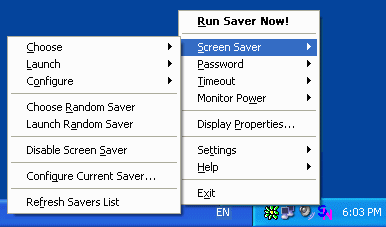
- Simply click the SaverNow icon on the system tray (near the clock on the task bar) to activate the current screen saver, double-click it to enable/disable the saver, or click the right mouse button on the icon for an options menu. (Note: these are the default click actions, and can be changed through the Settings menu.)
- You can have this random selection done immediately, every time the SaverNow icon is double-clicked, every time SaverNow is loaded, or you can even have a random saver activated by Windows each time you leave your computer. Enable these features in the Settings menu.
- You can change the screen saver settings for the Windows logon screen, known in Windows XP as the 'Welcome screen'. This screen is shown on some Windows versions when Windows first starts up, or when a screen saver is activated with password protection enabled.
- You can disable the screen saver for a given time period, thus preventing it from interfering with other running applications (such as CD burning software, presentations, etc.)
- Screen saver actions (activate, enable/disable, etc.) can be configured to run instantly when the tray icon is clicked, or when the mouse cursor is moved into one of the screen corners.
- Screen saver can be activated at any time using a configurable hotkey.
- Monitor power modes can be activated as well - You can instantly bring your monitor into standby/suspend/off mode to save power.
- Monitor can be turned off at any time using a configurable hotkey.
- The SaverNow icon ToolTip shows the current screen saver. Rest your mouse on the icon for a second to see it.
- Screen saver functionality and various settings can be controlled from the command line (command prompt) as well.
- It's totally free!
Enjoy!
How does it look?
Installation Notes
To install SaverNow, Double-Click the setup file. This will start a Setup Wizard that will guide you through the simple installation process.To uninstall SaverNow, select the Uninstall option from the Settings menu. You can also select Uninstall from the SaverNow Start Menu group, if you selected this option during installation.
What's New?
In version 3.0:
- Added global hotkey to power off monitor
- Added friendlier hours/minutes/seconds input for timeout dialog
- Added command line options for many settings and actions
- Added manual and automatic check for updates
- Fixed power off monitor on some systems
- Fixed manually starting saver when savers are disabled
- Fixed corner activation infinite loop on login screen
- Fixed corner activation when screen resolution changes
- Fixed missing tray icon in some rare cases
- Fixed setting Windows default (logon) saver on Vista and later (UAC)
- Fixed display properties not showing updated password state on Vista and later
- Migrated help format to MS HTML Help (chm file)
- Updated help documentation
- Lots of code refactoring
- Misc. improvements and fixes
In version 2.4:
- Disable timeout time left appears in tooltip
- Disable timeout shows little clock on icon
- New quick nested menu (right-click on saver) with unified saver list and default action setting
- Added saver properties to see a saver's location etc. in nested menu
- Monitor Power menu - for immediate power management mode setting
- Ability to set Windows default (logon) saver configuration
- Online Updates check
- Improved default folders handling
- Improved logging
- Misc. improvements and fixes
In version 2.3:
- Added ability to split long saver lists so all savers are visible
- Added ability to just launch (but not set) saver, just set (not launch), or both
- Corrected screen saver title inconsistencies which occurred on some Windows versions
- Removable media can be included in saver path list
- Windows and System (default) folders can now be excluded from saver path list
- Abort disable timeout shows time left
- Aborting disable timeout re-enables screen saver
- Current screen saver path is automatically added to path list
- Added toggling options to command line
- Added saver enable/disable command line option
- Added password enable/disable command line option
- Command line 'kill' option bypasses 'SaverNow already running' notice
License
Copyright (c) 1999-2024 by Amichai Rothman. All Rights Reserved.This Software is Freeware.
You may make copies, install and run it free of charge.
You may redistribute it to others, complete and unmodified from its original binary form, as long as you do so free of charge as well.
For non-commercial use only.
If you find this software useful please help support it by contributing a donation!
Donate
If you like it, why not give something back?
13aWWmQqkiYnpkWT7QmE9khnpuuuG48U7o

Contact
You can contact the author via e-mail at:Please write in with any bugs, suggestions, fixes, contributions, or just to drop a good word and let me know you've found SaverNow useful and you'd like it to keep being maintained.
For updates and additional information, you can always visit the website at: